πŸ”₯ THE ULTIMATE XAF AI PLATFORM

XAF Development
With AI + Automation Superpowers

The most advanced XAF platform in the world:
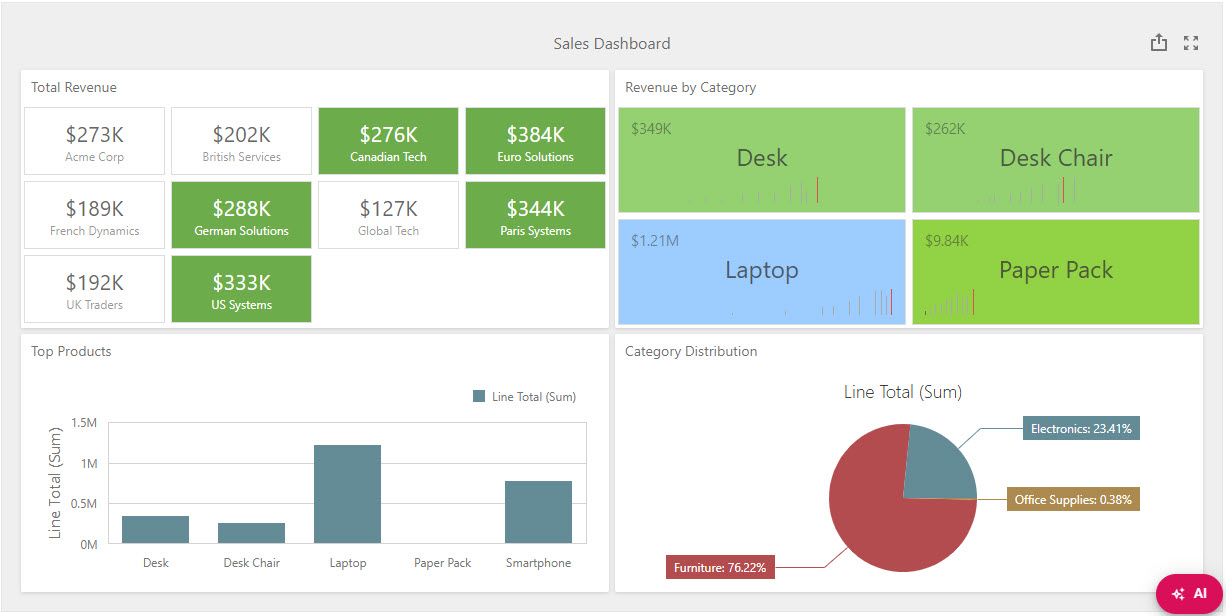
✨ Dashboards in 15s Β· πŸ€– Zero-Code Automation (ASON) Β· πŸ”₯ Scheduled Analysis
πŸ’¬ Chat AI with Insights Β· πŸ”Œ Bidirectional MCP Β· πŸ“Š Rich HTML Reports
100% Configurable Β· No hardcoding Β· By PeopleWorks Services

7
Productos IA
15s
Gen. Dashboards
∞
Auto-Tasks
MCP
Bidireccional
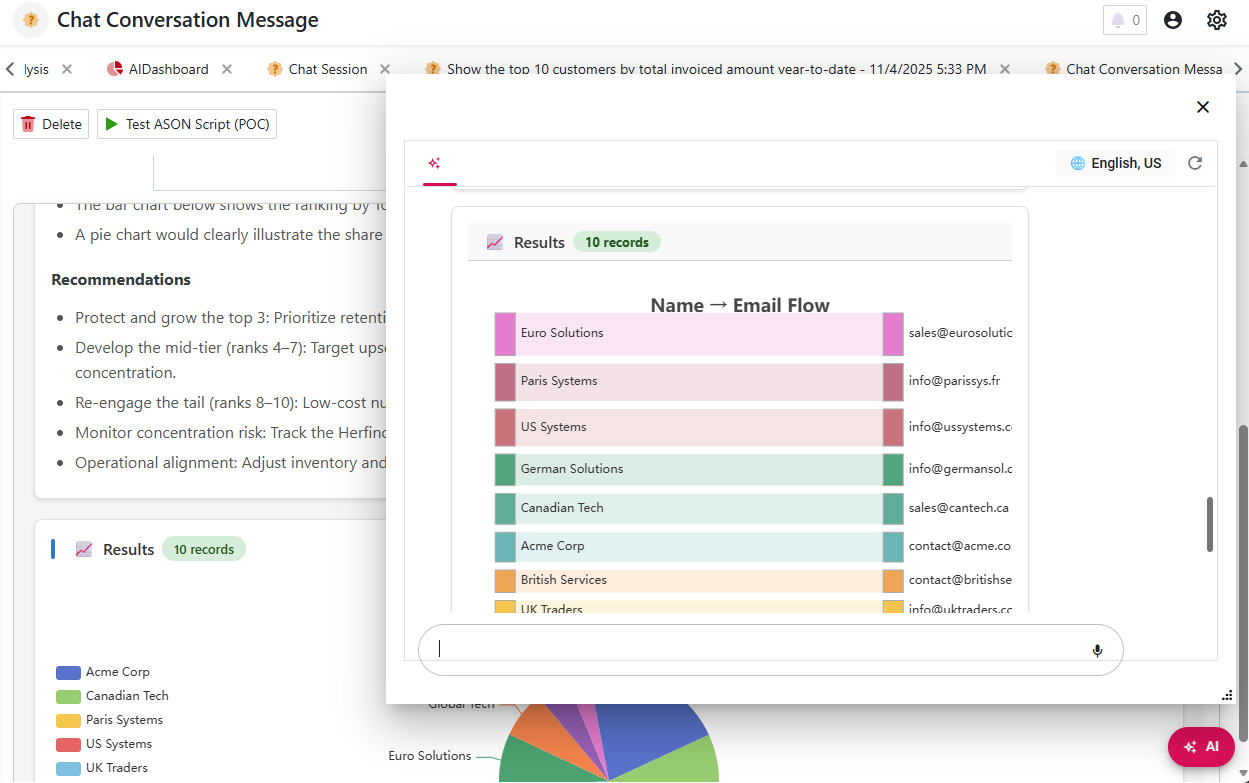
XAF AI Extensions - Chat AI with Real-Time Analysis, Charts, and Insights
Live AI Analysis with ECharts Visualizations
Parte del ecosistema:
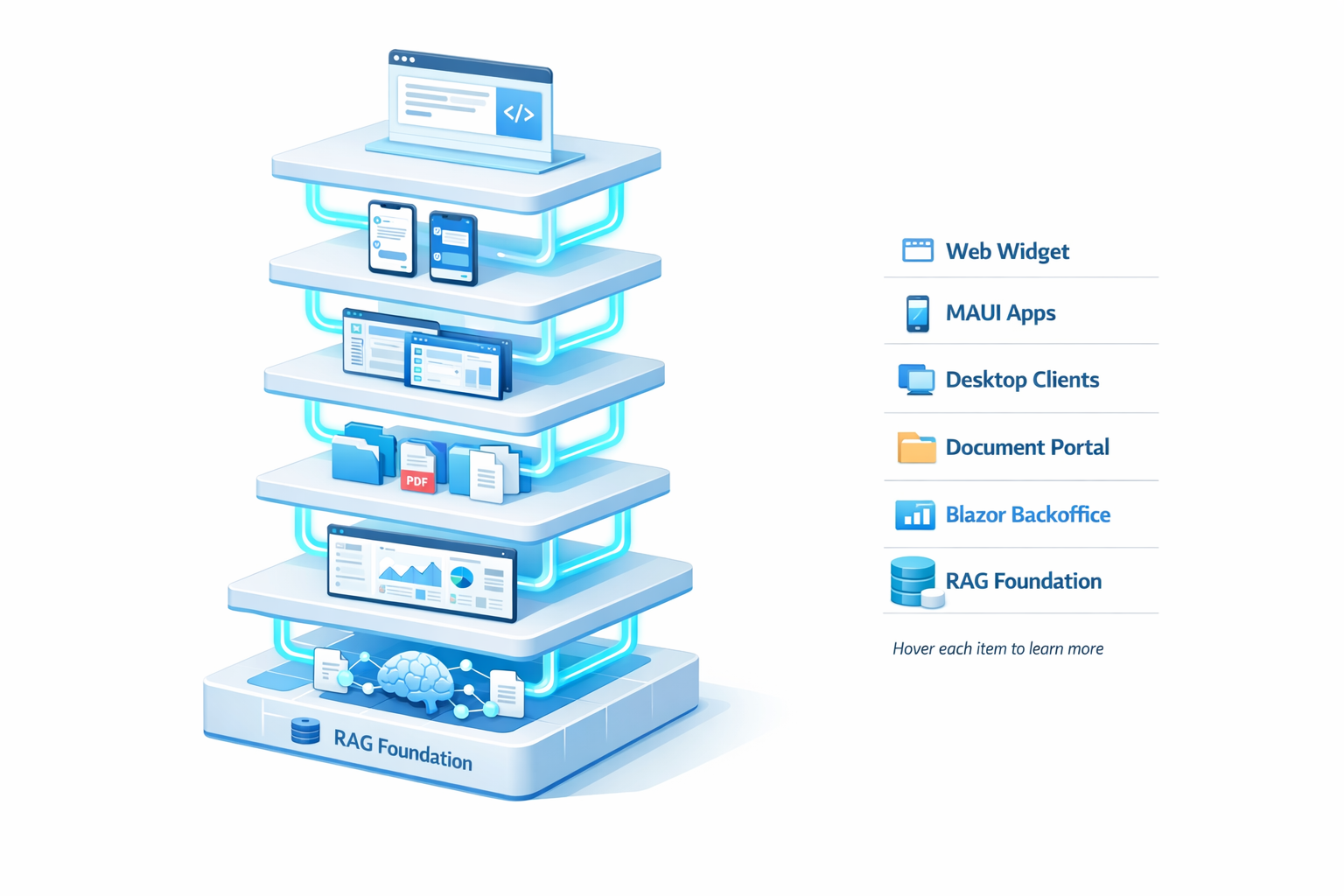
One Platform, Seven Superpowers

Not just AI. It's a complete enterprise automation suite for XAF.

ASON Tasks - Visual Task Automation

πŸ€– Zero-code enterprise automation. Schedule tasks, monitor executions, get results.

🎁

ASON: Open-Source Project + PeopleWorks Enhancements

ASON (Agent Script Operation) is an open-source project created by Alexander Russkov, Product Manager at DevExpress. It's a DSL (Domain-Specific Language) designed to automate operations in XAF applications through declarative scripts.

PeopleWorks Services has taken ASON to the next level with a revolutionary implementation:

  • ✨ Zero-Code UI - Complete visual configuration without writing ASON scripts
  • πŸ€– AI-Powered - Automatic script generation from natural language
  • πŸ“Š Real-Time Monitoring - Live statistics and metrics dashboard
  • πŸ“œ Comprehensive History - Complete audit trail with results and errors
  • πŸ”„ Visual Scheduling - Flexible scheduling (hourly, daily, weekly, monthly)
  • 🎯 AI Task Suggestions - AI suggests contextual automated tasks
  • πŸ”₯ Scheduled Analysis - Automatic analysis with rich HTML + ECharts

Agradecemos a Alexander Russkov por su contribuciΓ³n a la comunidad XAF. Nuestra implementaciΓ³n democratiza ASON para usuarios no-expertos y lo integra con IA.

🎯

Zero-Code Configuration

Create automated tasks entirely from the UI. No code, no deployments, no complications.

  • βœ… TaskName, Description, Category
  • βœ… Natural Language Prompt
  • βœ… Interval (hourly, daily, weekly, monthly)
  • βœ… Priority & Timeout settings
πŸ“Š

Real-Time Monitoring

Complete statistics dashboard: success rate, execution count, average duration, error tracking.

  • βœ… Success/Failure counts
  • βœ… Success rate percentage
  • βœ… Average execution duration
  • βœ… Last/Next execution timestamps
πŸ“œ

Comprehensive History

Complete audit trail of all executions with results, errors, and detailed metrics.

  • βœ… Start/End timestamps & duration
  • βœ… Generated script (if available)
  • βœ… Result data (JSON) & metrics
  • βœ… Error details (message + stack trace)
πŸ§ͺ

Manual Testing

Test your tasks manually before enabling automatic execution. Zero risk.

  • βœ… Test Task action (execute once)
  • βœ… View results before enabling
  • βœ… Adjust prompts and retry
  • βœ… Enable only when confident
⚑

Priority-Based Execution

Control execution order with priority system: High (90-100), Medium (60-89), Low (30-59).

  • βœ… High priority for critical tasks
  • βœ… Medium for regular operations
  • βœ… Low for maintenance tasks
  • βœ… Prevents concurrent execution
πŸ””

Error Tracking

Robust error handling system with timeout protection, detailed error messages, and graceful degradation.

  • βœ… Timeout protection
  • βœ… Error message + stack trace
  • βœ… Status tracking (Pending/Running/Completed/Failed)
  • βœ… Disable on repeated failures

Workflow de ASON Tasks

1

Create Task Configuration

Navigation: A.I β†’ ASON Task Configurations β†’ New
Define: TaskName, Category, NaturalLanguagePrompt, IntervalMinutes, Priority

2

Test Manually

Click "Test Task" to execute immediately
Review results in AsonTaskExecutionHistory
Adjust prompt if needed and retry

3

Enable Automatic Execution

Click "Enable" to activate automatic execution
Background service (AsonTaskExecutionService) takes over
Task runs on schedule with dynamic timers

4

Monitor & Optimize

Track statistics: success rate, execution count, avg duration
View execution history for detailed audit trail
Adjust timeout, priority, or schedule as needed

ASON Task Categories

πŸ“Š

Data Analysis

Automated data analysis tasks

πŸ“„

Report Generation

Scheduled report creation

πŸ“ˆ

Dashboard Creation

Auto-generate dashboards

βš™οΈ

Bulk Operations

Mass updates & processing

🧹

Data Maintenance

Cleanup & optimization

πŸ””

Alerts & Notifications

Proactive monitoring

🎨

Custom

User-defined tasks

Example ASON Tasks

πŸ“Š Daily Sales Dashboard

Category: DashboardCreation
Interval: Daily (1440 minutes)
Prompt: "Create dashboard showing today's sales revenue by category, top 10 products, and hourly trend"

πŸ”” Hourly Low Stock Alert

Category: AlertsAndNotifications
Interval: Hourly (60 minutes)
Prompt: "Find products with stock below reorder point and create notification"

πŸ“ˆ Weekly Customer Analysis

Category: DataAnalysis
Interval: Weekly (10080 minutes)
Prompt: "Analyze customer purchase patterns for the week, identify trends and top spenders"

🎯 AI-POWERED

Intelligent ASON Task Suggestions

AI analyzes your data model and suggests relevant automated tasks. Democratizes ASON for everyone.

🧠

Context-Aware Suggestions

AI analyzes:

  • βœ… BusinessSchema: Entities, properties, relationships
  • βœ… Knowledge Base: Business rules, best practices
  • βœ… Existing Tasks: Tasks already created to avoid duplicates
  • βœ… Industry Patterns: Common use cases by sector
⚑

Instant Task Creation

Simplified workflow:

  • βœ… Click "Get AI Suggestions" button
  • βœ… AI returns 5-10 contextual task ideas
  • βœ… Click suggestion β†’ Auto-fill form
  • βœ… Adjust if needed β†’ Create task
πŸ‘₯

Democratizes Automation

Benefits for all users:

  • βœ… Non-experts: Discover automation opportunities
  • βœ… Business users: No ASON syntax required
  • βœ… Developers: Accelerate task creation
  • βœ… Teams: Consistent automation patterns

Example AI Suggestions

For E-Commerce Application:

  • πŸ’‘ Daily Revenue Dashboard: "Create dashboard showing daily revenue, top products, and sales trends"
  • πŸ’‘ Low Stock Alerts: "Monitor inventory and notify when stock falls below reorder point"
  • πŸ’‘ Abandoned Cart Recovery: "Find carts older than 24h and trigger recovery emails"
  • πŸ’‘ Customer Churn Analysis: "Identify customers with no purchases in last 90 days"
  • πŸ’‘ Weekly Sales Report: "Generate comprehensive sales analysis every Monday at 9am"

For CRM Application:

  • πŸ’‘ Lead Scoring Update: "Recalculate lead scores daily based on activity and engagement"
  • πŸ’‘ Follow-up Reminders: "Find opportunities with no activity in 7 days and create tasks"
  • πŸ’‘ Pipeline Health Dashboard: "Visualize pipeline by stage, probability, and expected close date"
  • πŸ’‘ Duplicate Contact Cleanup: "Identify and merge duplicate contacts weekly"
  • πŸ’‘ Activity Report by Rep: "Generate weekly activity summary per sales rep"

Suggestion Workflow Integration

1

Open Task Configuration Popup

A.I β†’ ASON Task Configurations β†’ New
Popup appears with "Get AI Suggestions" button

2

AI Analyzes Your Application

AsonTaskSuggestionController β†’ AsonTaskSuggestionService
Reads BusinessSchema, Knowledge Base, existing tasks
Generates 5-10 contextual suggestions

3

Browse & Select Suggestion

Suggestions displayed as cards with title, category, description
Click any suggestion to auto-fill the form
All fields populated: TaskName, Category, Prompt, Interval, Priority

4

Customize & Create

Adjust any field if needed (prompt, interval, etc.)
Click "Test Task" to execute once
Click "Enable" to activate automatic execution

πŸ”₯ THE KILLER FEATURE πŸ”₯

Scheduled Analysis System

Rich HTML analyses automΓ‘ticos con ECharts charts. Mejor que dashboards estΓ‘ticos.

Why Is It Revolutionary?

Feature DevExpress Static Dashboards Scheduled Analysis System πŸ”₯ Visual Experience XML-based, limited styling βœ… Rich HTML + CSS + ECharts Cleanup Manual deletion of old dashboards βœ… Automatic retention periods AI Insights Data visualization only βœ… AI-generated analysis + insights Automation Manual creation βœ… ASON-powered automatic generation Chart Types DevExpress chart components βœ… 7 ECharts types (Bar, Pie, Line, Gauge, Sankey, Heatmap, Scatter) Statistics Basic aggregations βœ… Advanced stats (mean, median, trends, anomalies) Storage DashboardData table (complex XML) βœ… ScheduledAnalysis table (clean HTML) Email Distribution Requires external tools βœ… βœ… IMPLEMENTED: Embedded rich HTML emails

Architecture & Components

🎯

AnalysisOperator

ASON operator that executes the complete workflow:

  • βœ… Receives natural language query
  • βœ… Executes NL β†’ LINQ β†’ Database
  • βœ… AI analyzes results
  • βœ… Generates rich HTML with ECharts
  • βœ… Saves to ScheduledAnalysis entity
πŸ’Ύ

ScheduledAnalysis Entity

Business object that stores the analyses:

  • βœ… Title: Analysis title
  • βœ… HtmlContent: Rich HTML + charts
  • βœ… Category: Sales, Financial, Operational, etc.
  • βœ… RetentionDays: Auto-cleanup period
  • βœ… CreatedAt: Timestamp
πŸ“Š

Rich HTML Output

Superior visual experience vs static dashboards:

  • βœ… Professional HTML layout with cards
  • βœ… ECharts embedded (responsive, interactive)
  • βœ… AI-generated insights & recommendations
  • βœ… Statistical summaries (mean, median, trends)
  • βœ… Anomaly detection & alerts

Complete Workflow Example

1

Create ASON Task with AnalysisOperator

TaskName: "Daily Sales Analysis"
Category: DataAnalysis
Prompt: "Analyze today's sales: revenue by category, top products, hourly trends"
Interval: Daily (1440 minutes)

2

ASON Task Executes (Automated)

AsonTaskExecutionService triggers task at scheduled time
Calls AnalysisOperator with natural language prompt
Operator executes NL query pipeline

3

AnalysisOperator Generates Rich HTML

Query results β†’ AI analysis β†’ Insights
EChartsHelper detects chart type (Bar/Pie/Line/etc.)
HtmlResponseFormatter creates professional HTML
Embedded ECharts configuration (responsive, interactive)

4

Save to ScheduledAnalysis

AnalysisOperator creates ScheduledAnalysis record
Title: "Daily Sales Analysis - 2025-11-18"
HtmlContent: Complete analysis with charts
RetentionDays: 30 (auto-cleanup after 30 days)

5

Email Distribution (IMPLEMENTED)

Users view analysis in XAF UI (HTML viewer)
Export to PDF/HTML for distribution
βœ… IMPLEMENTED: Automatic email delivery with rich HTML embedded via Quartz Scheduler

Why This Changes Everything

100%
Automated

Zero manual intervention

10x
Better UX

Rich HTML vs static XML

∞
Scalable

Auto-cleanup with retention

7
Chart Types

ECharts auto-detection

"El Scheduled Analysis System es el componente que convierte XAF AI Extensions de 'otra plataforma de IA' a 'el sistema mΓ‘s avanzado del mercado'. Es la combinaciΓ³n perfecta de ASON automation + AI analysis + Rich HTML output. Nadie mΓ‘s tiene esto."

β€” Architecture Team, PeopleWorks Services

?? PRODUCTION READY

Quartz Scheduler + Email Automation

Persistent scheduling with SQL Server + Automatic HTML notifications. Already implemented and ready to use.

13
Quartz Tables

Auto-created

2
Code Lines

Integration

3
Email Types

Create/Success/Fail

?
Production

Battle-tested

??

Hybrid Architecture (Quartz + ASON)

Perfect combination of robust scheduling with intelligent execution:

  • ? Quartz.NET 3.15 - Enterprise scheduling with SQL persistence
  • ? AsonTaskExecutionService - Execution logic with timeout protection
  • ? Email Notifications - Rich HTML with embedded ECharts
  • ? QuartzSchemaInitializer - Auto-creates 13 tables on first run
βš™

Integration in 2 Lines of Code

For client projects, integration is ridiculously simple:

// Startup.cs - ConfigureServices
services.AddAsonScheduler(Configuration);

// Startup.cs - Configure
app.ApplicationServices.SyncAsonTasksToQuartzAsync().GetAwaiter().GetResult();
                    

That's ALL. Quartz automatically configures: UnitOfWork, persistence, jobs, email service.

Automatic Email Notifications

?? Task Created

Email when a new ASON task is created with schedule details

? Analysis Completed

Rich HTML with embedded ScheduledAnalysis - ECharts charts included

? Task Failed

Error details, stack trace, and recommended actions

Why Quartz + ASON?

Persistent Scheduling

Survives restarts, deployments, and crashes. Jobs stored in SQL.

Production-Ready

Quartz.NET is used by Fortune 500. Battle-tested. Enterprise-grade.

Zero Configuration

Schema auto-init, connection string cleanup, everything automatic.

Email Distribution

Stakeholders receive analyses automatically. No manual intervention.

Deployment Options

?? Docker - Containerized deployment
?? Azure - App Service, Container Apps
?? IIS - Windows Server deployment
?? Linux - Systemd service
πŸŽ›οΈ Poder Total

100% Configurable. Cero Hardcoding.

Todos los prompts, reglas de IA, ejemplos y conocimiento son configurables desde la UI. Sin rebuilds. Sin deployments. Cambios en tiempo real.

System Prompts Editables

Todos los prompts de IA se almacenan en la base de datos. EdΓ­talos desde la UI y la IA se adapta instantΓ‘neamente.

Description Attributes

Document your business objects with [Description]. The AI reads them to understand your data model.

[Description("Valor base para calcular comisiones")]
public decimal CommissionBase { get; set; }

Knowledge Base / RAG

Agrega reglas de negocio, mejores prΓ‘cticas, y conocimiento de dominio. La IA lo usa automΓ‘ticamente con relevance scoring.

PromptExample Learning

Dashboards exitosos β†’ Ejemplos para la IA. Sube XMLs y screenshots, la IA aprende tus patrones.

Entity Exclusion

Controla quΓ© entidades ve la IA. Excluye datos sensibles o internals con un click.

MCP Server Config

Configura conexiones a servidores MCP externos: DevExpress docs, wikis, GitHub, Confluence.

MCP Bidireccional

Model Context Protocol: Consume y es consumida

MCP Server (Outbound)

Expone tu XAF

Your XAF application becomes an MCP Server that Claude Desktop and VSCode can consume.

Exposed Tools:

  • query_database - Natural language β†’ LINQ β†’ Execute β†’ Analyze
  • list_entities - List entities respecting exclusions
  • get_schema - Complete ORM metadata
  • add_knowledge - Add to Knowledge Base
  • search_knowledge - Search in Knowledge Base

Features:

  • Multi-tenant (username@tenant)
  • User validation & security
  • STDIO/HTTP/SSE transports
  • Docker & Azure ready

MCP Client (Inbound)

Consume external

Your XAF can consume external MCP servers to enrich AI with real-time knowledge.

Supported Sources:

  • πŸ“– DevExpress Docs - Official documentation
  • πŸ“š Company Wiki - Confluence, Notion
  • πŸ’Ό Industry Data - Specialized APIs
  • πŸ™ GitHub - Repos, issues

ΒΏPor QuΓ© MCP es Game-Changer?

πŸ”Œ

Extensibilidad Infinita

Conecta a cualquier fuente de conocimiento: docs, wikis, APIs, sin cambiar cΓ³digo.

🀝

Ecosistema Colaborativo

Usa MCP servers de la comunidad. Comparte tu server con otros.

⚑

IA Siempre Actualizada

Docs cambian? Wiki se actualiza? La IA lo sabe al instante.

πŸš€

Future-Proof

EstΓ‘ndar abierto respaldado por Anthropic. InversiΓ³n segura.

πŸ”΄ OPTIONAL ADVANCED FEATURE

GraphRAG: Beyond Simple Queries

AI that understands business relationships, not just data retrieval

Traditional AI (Vector RAG)

User: "Why did sales drop?"

AI: "Searching for 'sales' and 'drop'..."

Result: 10 documents about sales.
You still don't know WHY.

  • Retrieves data
  • Can't explain "why"
  • Isolated answers
  • You connect the dots

GraphRAG (Relationship Intelligence)

User: "Why did sales drop?"

AI: "Tracing relationship graph..."

Result: "Campaign X ended β†’ 20% drop in new customers β†’ 15% sales decrease"
EXACT answer with full context.

  • Understands relationships
  • Explains "why" and "how"
  • Connected answers
  • AI connects the dots

🎯 Real-World Use Cases

πŸ”

Root Cause Analysis

"Why do sales and accounting never match?"

GraphRAG shows: "Sales includes pending invoices, Accounting only counts paid ones. Path diverges at Invoice β†’ Payment step."
🌊

Business Process Visualization

"Show me order fulfillment process"

GraphRAG maps: Order β†’ Inventory β†’ Picking β†’ Shipping β†’ Delivery β†’ Invoice β†’ Payment β†’ Accounting Entry
⚑

Impact Analysis

"If we change commission formula, what's affected?"

GraphRAG reveals: Payroll β†’ Accounting β†’ Financial Statements β†’ Dashboard β†’ Forecasting (6 systems affected!)
πŸ“œ

Audit Trail

"Show approval chain for Invoice #12345"

GraphRAG traces: Created by John β†’ Manager A approved β†’ CFO rejected (reason: exceeds budget by $25K)

The Technology Behind It

GraphRAG combines Knowledge Graphs (maps all relationships), Graph Database (Neo4j or Apache AGE), and AI Reasoning (navigates multi-hop connections).

300%

Improvement in complex query accuracy

10x

Faster root cause analysis

$0

Neo4j Community Edition (free)

GraphRAG is OPTIONAL

XAF AI Extensions works perfectly without GraphRAG. Start with Vector RAG (included), upgrade to GraphRAG when you need advanced relationship queries. Just flip a switch in settings.

βœ… Base

Vector RAG β€’ LINQ Queries β€’ AI Analysis β€’ Dashboards

πŸš€ + GraphRAG

Everything in Base + Relationship Intelligence + Root Cause + Impact Analysis

"GraphRAG is like having a business analyst who knows every connection in your dataβ€” and can explain it in simple language. We went from 'search the database and wait' to 'AI shows me the exact 5-step chain that causes the problem.' Total game changer."

β€” Early Adopter Feedback (Beta Testing)

πŸ† OUR EXPERTISE

What We Build with DevExpress XAF

Showcasing our capabilities across industries and technologies

Proven Track Record

50+

XAF Projects Delivered

10+

Years of Experience

150+

Custom Modules Built

98%

Client Satisfaction

Ready to Transform Your Business?

From concept to deployment, we bring your XAF vision to life with cutting-edge technology

πŸš€ COMING SOON

Roadmap: ASON Scheduler Calendar + Email Notifications

The next evolution: Visual calendar + Rich HTML email delivery

🌟 Priority 0: THE ULTIMATE KILLER FEATURE

CombinaciΓ³n de ASON automation + AI analysis + Visual calendar + Rich HTML emails = Sistema que nadie mΓ‘s tiene en el mundo XAF

πŸ“… DevExpress Scheduler Calendar Integration

Visual calendar showing all scheduled ASON tasks:
βœ… Color-coded by task category and execution status
βœ… Recurring task patterns visualization
βœ… Team collaboration through shared calendar
βœ… Reference: c:\Proyecto\XAFProjects\XafSchedulerDemo\ (existing implementation)

πŸ“§ Rich HTML Email Notifications

Email delivery of ScheduledAnalysis results:
βœ… Email on task creation with schedule details
βœ… Rich HTML email delivery with embedded ECharts charts
βœ… Email alerts on task failures with error details & quick actions
βœ… Automated distribution to stakeholders

🎯 Complete Automation Ecosystem

The perfect workflow:
βœ… ASON task executes β†’ AnalysisOperator generates rich HTML
βœ… ScheduledAnalysis saved to DB (with retention)
βœ… Email notification sent with full HTML + charts embedded
βœ… Calendar shows next execution
βœ… Users view history in XAF UI or email archive

"When we combine ASON automation + Scheduled Analysis + Calendar + Email, we'll have the most advanced enterprise automation system in the XAF ecosystem. DevExpress doesn't have anything similar. The competition doesn't have anything similar. It's our definitive competitive advantage."

β€” Product Vision, PeopleWorks Services

Q1
2026

Scheduler Calendar

Q2
2026

Email Notifications

Q3
2026

Team Collaboration

Q4
2026

Mobile Apps

Ready to Transform Your XAF Development?

Join the AI + Automation revolution in XAF

πŸ”’ No credit card required Β· ⚑ 5-minute setup Β· 🎯 Full support